Hippo is a personal CRM built for Apple platforms. Keep notes, events, and to-dos for the friends, family, and colleagues you care about — all stored on your device. No account. No cloud server. No Contacts permission required.
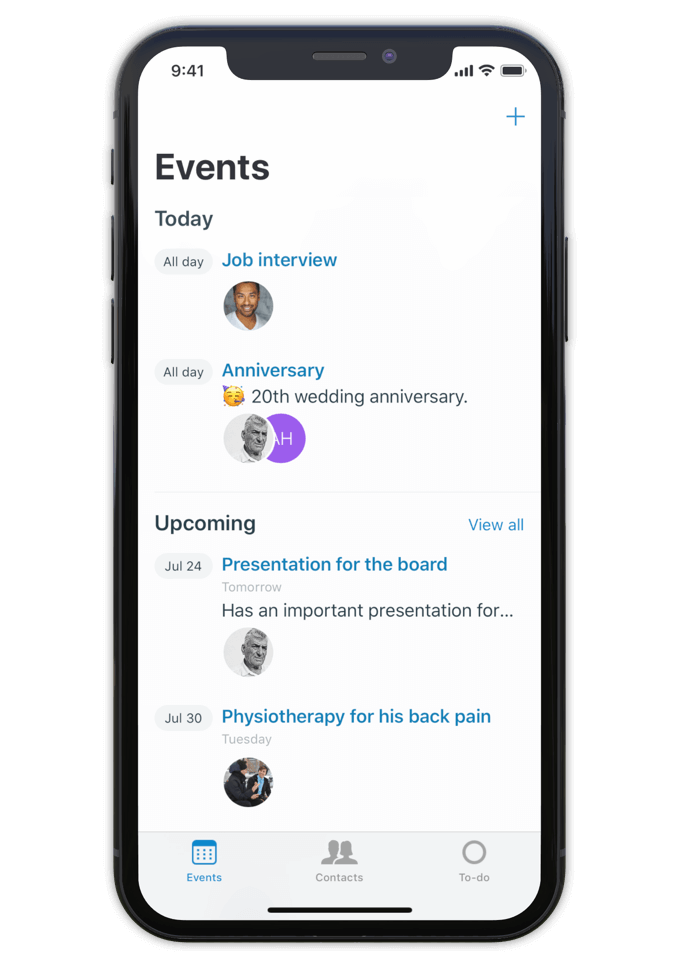
Hippo is a personal CRM for iPhone, iPad, and Mac. A personal CRM helps you keep track of the people in your life the way a sales CRM helps a salesperson track leads — but focused on the relationships that actually matter to you. Friends, family, mentors, colleagues, the people you want to stay close to.
Unlike most personal CRMs, Hippo stores everything on your device. There’s no account to sign up for, no server holding your contacts, and access to your iOS Contacts list is never required (it’s optional, and granted contacts still stay on-device). Optional sync runs through your own private iCloud Drive — never through Hippo.
Hippo is built for people who want to be more attentive without trading their privacy for the privilege.
Make notes, keep track of events and store to-dos for all your contacts.
So next time you meet, a quick glance at the person's profile in Hippo is all you need to remember the details.
Being attentive doesn’t have to be a challenge anymore.
Hippo is your personal reminder.

Use notes to quickly jot down things you learned about your contacts. Like names of kids, new jobs, a promotion, holiday plans, or gift ideas.
Create events for face to face meetings or important life events.
Get reminded when the event is happening so you can ask about it.
Remember the questions you want to ask the next time you meet.
Hippo is the personal CRM that doesn’t want your data.

Monica is a powerful open-source personal CRM, but it’s web-based and requires either a paid hosted plan or self-hosting your own server. Monica’s recent v5 update has shifted the product toward life journaling and modular vaults. If you want a focused personal CRM that runs natively on iPhone, iPad, and Mac with no setup, Hippo is the closer fit.
Dex is a strong choice if your relationships are heavily LinkedIn-driven and you want cross-platform sync via a Dex account. Hippo runs natively on Apple platforms (iPhone, iPad, and Mac) and is built around on-device privacy — your contact data never leaves your device unless you choose to sync via iCloud.
Clay enriches your contacts with public data from across the web. Hippo intentionally doesn’t do this. If you want enrichment, Clay is the right tool. If you want your data to stay local and untouched, Hippo is.
Hippo offers a one-time lifetime purchase option (uncommon in the category) and is the only one that works without ever requesting your iOS Contacts list.

Hi 👋, I’m Roel
I have been struggling with my memory all the time, at work and at home. I used to forget children’s names, someone's job, birthdays, anniversaries and other important life events. At work I couldn’t remember when or how a decision was made.
This made me insecure and unhappy. That is why I built Hippo.
With the Hippo app, I can remember all the important things about the persons I care for. A quick note usually does the job. It is simple and effective … and has changed my life! Hippo has helped me to become a better friend, partner and colleague.
Hippo is free to try for 1 month. After the trial, it’s $14.99 per year or $29.99 as a one-time lifetime purchase.
To view the pricing in your currency, see Hippo in the App Store.

Free to try for one month.
While you can burn the ISO to a DVD, a USB flash drive is faster and more practical. Insert a blank USB drive (minimum 4GB) into your PC. Download and launch Rufus . Select your USB drive under the "Device" dropdown.
The core strength of DLC Boot 2015 lies in its dual-boot environment, which supports both legacy BIOS and modern UEFI systems. When booting from the ISO, users are greeted with a menu offering two distinct environments: 1. Mini Windows XP
A: DLC Boot includes English and Vietnamese interfaces. Most tools are in English, while some of the menu items may be in Vietnamese depending on the version.
Power on the machine and repeatedly press the system's Boot Menu key (typically F12, F11, F8, or Esc depending on the manufacturer). Select the USB flash drive from the boot list. Dlc Boot 2015 Iso Download
Choose partition scheme for older BIOS systems, or GPT for modern UEFI systems.
Torrents often preserve original files. Search for a torrent with:
| Category | Examples of Tools | |---|---| | Backup Tools | Acronis True Image, Macrium Reflect, AOMEI Backupper | | Disk Tools | MiniTool Partition Wizard, HDD Low Level Format, Victoria | | Tools for Mini Windows | File managers, registry editors, system information tools | | Driver Tools | Driver Genius, Double Driver, Driver Magician Lite | | Network | Network scanners, LAN viewers, internet diagnostic tools | | Recovery | Recuva, PhotoRec, TestDisk, data recovery utilities | | Hardware Tools | MemTest86, CPU-Z, GPU-Z, HDDScan, CrystalDiskInfo | | Office Tools | LibreOffice Portable, Sumatra PDF, Notepad++ | | Antivirus | Kaspersky Virus Removal Tool, ESET Online Scanner, Malwarebytes | | System Tools | CCleaner, Regedit, Process Explorer, Autoruns | | USB Tools | Rufus, USB Format Tool, HP USB Disk Storage Format Tool | | Microsoft Crack Tools | Tools for extracting serial codes from PCs that cannot boot | While you can burn the ISO to a
is widely considered a "Swiss Army Knife" for system maintenance. This comprehensive rescue kit allows you to boot into a specialized environment to fix errors, recover lost files, and bypass passwords without ever needing to enter your main operating system. What is DLC Boot 2015?
DLC Boot 2015 is a powerful and comprehensive tool for system maintenance, repair, and recovery. The ISO image provides a wide range of tools and features, making it a valuable resource for users who need to troubleshoot and repair their computers. By following the steps outlined in this report, users can easily download the DLC Boot 2015 ISO file and start using it to maintain and repair their systems.
If you would like to proceed with setting up your own rescue media, let me know: Select your USB drive under the "Device" dropdown
environments, which provide a familiar desktop interface for troubleshooting even if your main hard drive is corrupted. Key Features and Tools
Under , click Select and browse to your downloaded DLC Boot 2015.iso file.
Open Rufus and select your targeted USB flash drive under the "Device" option.
© Quiet Deck 2026. All Rights Reserved.